

You may be looking for the suitable parameters to refer for mig 200, the simple wizard will help you with some mig 200 basic setup.
The suitable parameters for ARCCAPTAIN MIG 200 depend on several factors such as the type of material you will weld, the thickness of the material, the welding position, and the wire size being used.
ArcCaptain MIG 200 Overview
The ArcCaptain MIG 200 is a multi-process welder that supports MIG (GMAW), flux-cored, and lift TIG welding. Its compact design and dual voltage capability (110V/220V) make it suitable for both shop and field applications.
What's Included:
- ArcCaptain MIG 200 main unit
- MIG torch with cable
- Ground clamp and cable
- Gas regulator and hose
- Drive roller set
- Wire spool adapter
- User manual and settings guide
Ideal For:
- Automotive restoration and repair
- Metal fabrication projects
- Farm and ranch equipment maintenance
- DIY home improvements
- Light industrial applications
- Beginner to intermediate welders
ArcCaptain MIG 200 Parameter Settings Guide
Here are some general guidelines to help you get started with setting up suitable parameters for ARCCAPTAIN MIG 200:
-
Determine the type and thickness of the material you will weld. This information will help you choose the appropriate wire size and shielding gas.
-
Select the appropriate wire size and drive roller type based on the thickness of the material. For example, for welding thin sheet metal, you might use a 0.023 inch wire, while for thicker material, you might use a 0.035 inch wire.
-
Choose the appropriate shielding gas for the material being welded. For mild steel, you might use a mix of 75% Argon and 25% CO2. For stainless steel, you might use a mix of 98% Argon and 2% CO2.
-
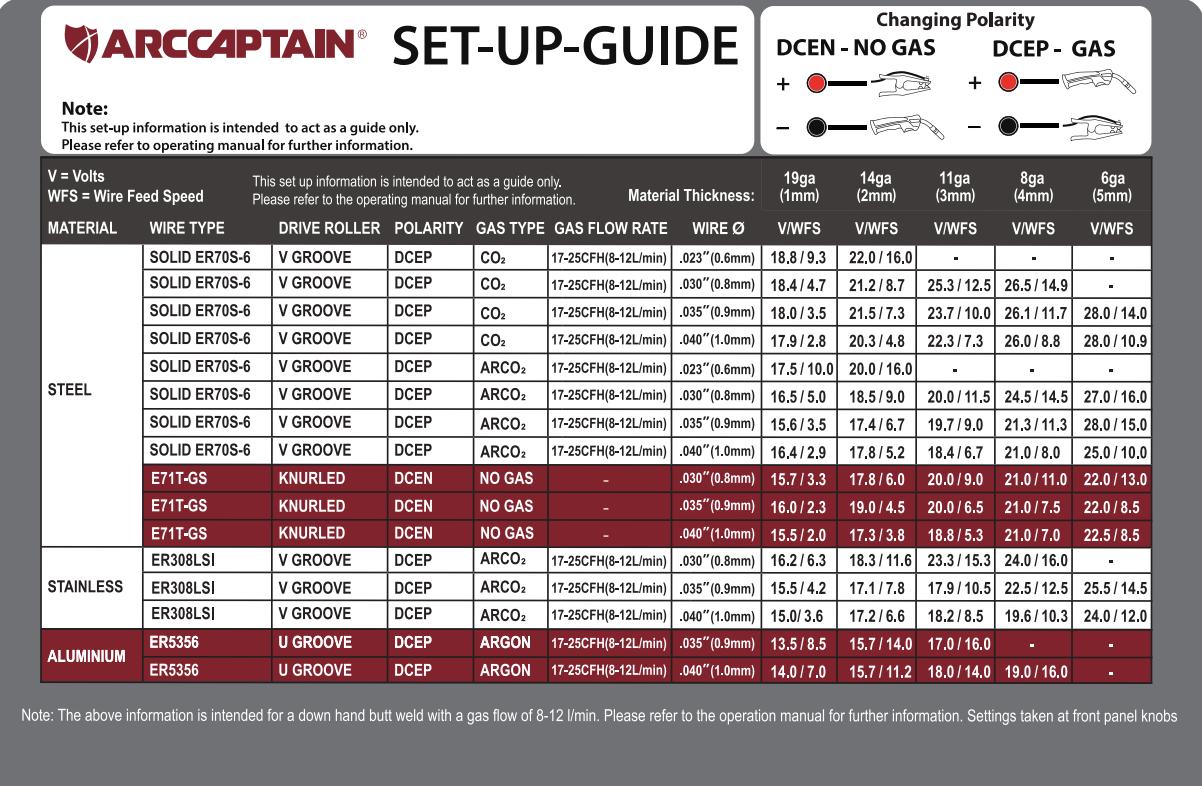
Set the voltage and wire feed speed based on the wire size and material thickness. You can see the guide image to choose suitable WFS.
-
Test your settings on a scrap piece of material before welding on the actual workpiece.
-
Adjust the settings as necessary based on the welding position, joint type, and other variables.
Setting Parameters by Material Type
Mild Steel Settings
Mild steel is the most common material welded with the ArcCaptain MIG 200. Use C25 shielding gas (75% Argon / 25% CO2) for best results.
| Material Thickness | Wire Size | Voltage | Wire Feed Speed | Amperage |
|---|---|---|---|---|
| 18-22 gauge (thin) | 0.023" | 16-17V | 180-220 ipm | 40-60A |
| 16 gauge | 0.030" | 17-18V | 200-250 ipm | 60-80A |
| 1/8" (3mm) | 0.030" | 18-19V | 250-300 ipm | 80-110A |
| 3/16" (5mm) | 0.035" | 19-21V | 300-350 ipm | 120-150A |
| 1/4" (6mm) | 0.035" | 21-23V | 350-400 ipm | 150-180A |
| 3/8" (10mm) | 0.040" | 23-25V | 400-450 ipm | 180-200A |
Pro Tip: Start with lower settings and gradually increase until you achieve a smooth, consistent arc with a bacon-sizzle sound.
Stainless Steel Settings
For stainless steel, use tri-mix gas (90% Helium / 7.5% Argon / 2.5% CO2) or C2 gas (98% Argon / 2% CO2).
| Material Thickness | Wire Size | Voltage | Wire Feed Speed | Gas Type |
|---|---|---|---|---|
| 18-20 gauge | 0.030" | 16-17V | 180-220 ipm | C2 or Tri-mix |
| 1/8" (3mm) | 0.030" | 17-19V | 220-280 ipm | C2 or Tri-mix |
| 3/16" (5mm) | 0.035" | 19-21V | 280-340 ipm | C2 or Tri-mix |
| 1/4" (6mm) | 0.035" | 21-23V | 340-400 ipm | Tri-mix preferred |
Important: Stainless steel requires cleaner base metal preparation and lower heat input to prevent warping and maintain corrosion resistance.
Flux-Cored Wire Settings (Gasless)
Flux-cored welding with the ArcCaptain MIG 200 is ideal for outdoor work or when shielding gas isn't available.
| Material Thickness | Wire Size | Voltage | Wire Feed Speed |
|---|---|---|---|
| 16-18 gauge | 0.030" | 17-18V | 200-250 ipm |
| 1/8" (3mm) | 0.035" | 18-20V | 250-320 ipm |
| 3/16" (5mm) | 0.035" | 20-22V | 320-380 ipm |
| 1/4" (6mm) | 0.045" | 22-24V | 380-440 ipm |
Note: Remember to switch polarity to DCEN (electrode negative) when using self-shielded flux-cored wire, and ensure proper ventilation due to increased fumes.
Shielding Gas Recommendations for ArcCaptain MIG 200
The right shielding gas significantly impacts weld quality, penetration, and spatter levels.
Gas Selection Chart:
| Material | Recommended Gas | Gas Flow Rate | Benefits |
|---|---|---|---|
| Mild Steel | C25 (75% Ar / 25% CO2) | 20-25 CFH | Good penetration, minimal spatter |
| Mild Steel (budget) | 100% CO2 | 25-30 CFH | Deep penetration, more spatter |
| Stainless Steel | C2 (98% Ar / 2% CO2) | 20-25 CFH | Clean welds, good arc stability |
| Stainless Steel (premium) | Tri-mix (90% He / 7.5% Ar / 2.5% CO2) | 25-30 CFH | Excellent finish, faster travel |
| Aluminum | 100% Argon | 25-30 CFH | Clean oxide removal, stable arc |
Gas Flow Rate Tips:
- Too Low (below 15 CFH): Porosity and contamination
- Optimal (20-25 CFH): Clean welds with minimal waste
- Too High (above 35 CFH): Turbulent flow, gas waste, potential contamination
It's important to note that the best parameters for ARCCAPTAIN MIG 200 may vary based on the specific application and welding conditions. Therefore, always follow the recommendations and adjust the settings based on your own experience and testing.
The following setting guide image can help you better set related parameters.
Who Should Buy the ArcCaptain MIG 200?
Ideal Buyers:
- Hobbyists upgrading from a 140-amp machine
- DIY enthusiasts tackling automotive and home projects
- Small fabrication shops on a budget
- Mobile welders needing dual voltage capability
- Beginners wanting room to grow their skills
- Farmers and ranchers doing equipment repairs
Consider Alternatives If:
- You primarily weld aluminum (get a dedicated TIG/MIG machine)
- You only have 110V and regularly weld 3/16"+ steel
- You need industrial-grade duty cycle (90%+)
- Your budget allows for premium brands with better warranties
Common Issues and Troubleshooting
Even with proper setup, you may encounter issues with your ArcCaptain MIG 200. Here are solutions to common problems:
Wire Feed Problems
Problem: Wire feeding erratically or bird-nesting
Solutions:
- Check drive roller tension (should be firm, not crushing the wire)
- Verify correct drive roller type for your wire
- Inspect liner for kinks or blockages
- Ensure wire spool rotates freely
- Clean drive rollers of debris and wire shavings
- Replace worn contact tip
- Straighten the MIG gun cable if severely twisted
Problem: Wire won't feed at all
Solutions:
- Verify power to the wire feed motor
- Check that the trigger switch is functioning
- Inspect wire path for obstructions
- Ensure wire is properly threaded through all guides
- Test with fresh wire (old wire may have surface oxidation)
Poor Penetration
Problem: Weld sits on top of base metal without fusion
Solutions:
- Increase voltage by 1-2V increments
- Increase wire feed speed slightly
- Reduce travel speed
- Improve work angle (push angle 5-15°)
- Clean base metal more thoroughly (remove mill scale, rust, paint)
- Preheat thicker materials above 1/4"
- Switch to higher argon content gas for steel
Excessive Spatter
Problem: Spatter covers workpiece and nozzle
Solutions:
- Reduce voltage slightly
- Decrease wire feed speed
- Clean contact tip and nozzle
- Check gas flow rate (should be 20-25 CFH)
- Verify shielding gas quality and mixture
- Inspect ground connection quality
- Apply anti-spatter spray to nozzle
- Replace worn contact tip
Porosity Issues
Problem: Small holes or voids in the weld bead
Solutions:
- Increase gas flow rate (but not above 30 CFH)
- Check for gas leaks in hoses and connections
- Shield weld from wind/drafts
- Clean base metal of oil, grease, moisture, and rust
- Verify gas cylinder isn't empty
- Check for contaminated or incorrect gas mixture
- Reduce travel speed to allow proper gas coverage
- Ensure contact tip isn't recessed too far into nozzle
Burn-Through
Problem: Holes melted through thin material
Solutions:
- Reduce voltage and wire feed speed
- Increase travel speed
- Use smaller diameter wire (0.023" for thin gauge)
- Switch to pulsed mode if available
- Improve fit-up to minimize gaps
- Use skip welding technique on long seams
- Consider using backing material
- Practice on scrap to find optimal settings
Inconsistent Arc
Problem: Arc starts and stops, or sounds irregular
Solutions:
- Tighten all cable connections
- Inspect ground clamp for solid contact
- Check for damaged cables or connections
- Clean contact tip threads
- Verify proper polarity (DCEP for solid wire, DCEN for self-shielded flux-core)
- Test with different contact tip
- Check input power stability
Hi – Can I get a higher resolution picture on the setting guide for the ARCCAPTAIN MIG 200